



For an awards show, fan contest or school election, data privacy in online voting comes down to four decisions: what you collect from each voter, how you verify that voter, who can see the data, and how long you keep it. Collect only what the vote needs, tell voters plainly what happens to it, and delete it when the contest is over. Izivote is built for public audience awards and offers open, paid, login and identity-based voting, so you can match the amount of voter data to the stakes of your event instead of collecting everything by default.
This guide is for organizers of people’s choice awards, pageants, nonprofit contests, community polls and student elections. It is not about government elections, which follow separate legal rules.
Key Takeaways
- Privacy in an awards vote means two things: protecting the data voters give you, and not letting anyone link a named person to a specific choice unless you have a clear reason and have said so.
- Collect the minimum. An open vote needs almost nothing, an email or SMS check needs one contact detail, and a paid vote needs payment handling.
- Tell voters in plain words who you are, what you collect, who processes it, how long you keep it and how to ask for deletion.
- Match verification to the stakes: the stronger the check, the more personal data you hold and the more you must protect it.
- Set a deletion date before voting opens, not after the winners are announced.
Table of Contents
- Why election-grade standards are the right yardstick for privacy
- What personal data an online vote can involve
- Choose a verification method that fits the stakes
- Keep identity and choice apart
- Who sees what: limit organizer and team access
- What to tell voters
- Know which rules apply to you
- Retention: plan the deletion before the voting
- A privacy checklist before you launch
- Where Izivote fits
- FAQ
- Sources
Why election-grade standards are the right yardstick for privacy
A fan award is not a public election, and nobody expects you to meet government election law. But the privacy principles written for official elections are a useful yardstick because they are clear, tested and easy to scale down.
The U.S. National Institute of Standards and Technology (NIST) publishes principles for voting systems that say ballot secrecy should be maintained throughout the voting process. They also say a system should not produce records that can associate a voter’s identity with their choices. The Council of Europe’s guidelines on processing personal data in elections list lawfulness, fairness, transparency, purpose limitation, data minimisation, accuracy and security as the core principles for voter data.
You do not need to read either document. Translate them into five habits for your own contest:
- Collect only what you need to count a vote fairly.
- Use the data only for running that contest.
- Keep names and choices apart wherever you can.
- Limit who can see voter details.
- Delete the data when the purpose ends.
The rest of this article shows how to apply each habit.
What personal data an online vote can involve
Most voters worry about one thing: “Will someone know I voted for them?” In practice, an online vote touches several kinds of data, and it helps to list them before you build your page.
| Data type | Example | Why you might need it |
|---|---|---|
| Identity details | Name, email, phone number | To confirm one person, one vote |
| Technical data | IP address, browser type, access time | To spot repeated or automated voting |
| Payment data | Card details, receipt email | Only for paid voting |
| The vote itself | Nominee and category chosen | To produce results |
| Nominee data | Photo, bio, social links | To publish the ballot |
Official voting services publish what they collect, and the lists are a good model. Wisconsin’s public voter portal says it collects details such as name, date of birth, address, email and phone number, plus technical data like IP address and browser type, and that it does not collect sensitive data such as race, religion or political affiliation. Estonia’s voting application explains that it processes an IP address and the country of location to detect attacks or fraud, which is a stated purpose rather than a vague “improving our service.”
Two lessons carry over to your contest. Each item has a stated reason, and sensitive categories that the vote does not need are simply not collected. If you cannot name the reason for a field on your voting form, remove the field.
Choose a verification method that fits the stakes
Verification is where privacy and integrity pull against each other. Asking for more proof of identity makes it harder to stuff the ballot box, but it means you hold more personal data. The right answer depends on what the contest is worth.
Izivote supports open voting, paid voting, login-based voting and identity-based voting, and you can read how each works in the voting types and voter identity guide. Here is a practical way to choose.
Low stakes: open voting
A staff-favorite poll or a club’s “best bake sale item” needs no personal data at all. Open voting keeps the information you hold to a minimum, which is itself a privacy benefit. If the prize is bragging rights, this is usually enough.
Medium stakes: email or SMS checks
When a prize, sponsorship or public reputation depends on the result, a light check helps keep the count honest. Email verification asks for an address, and SMS verification with a one-time code asks for a phone number. Each adds one piece of contact data. Phone numbers are more personal than email addresses for most people, so pick the lighter option when it does the job. For a wider look at stopping repeat votes without over-collecting, see how to prevent duplicate votes in online contests and awards.
Higher stakes: login or identity-based voting
For member-only votes, employee polls or student elections, where only eligible people may vote, login-based or identity-based voting ties each ballot to an eligible person. That is appropriate when eligibility is the point. It also raises your duty to say how identity data is used and kept, which the next sections cover.
Paid voting
When votes are sold to raise funds, voters hand over payment details. Izivote’s paid voting handles payments through the platform and charges a 10% platform fee per vote. Tell voters clearly that their payment is processed through the platform and what receipt information you will see. Our paid voting use case explains the setup.
Keep identity and choice apart
The strongest privacy principle in election standards is separation: whoever confirms that you are eligible should not be able to see how you voted. NIST puts it as a system that does not contain or produce records linking voter identity to the voter’s intent or selections. Canada’s national standard for municipal online voting goes further and says a vote should be stored without any reference to the voter.
For an awards contest you do not have to meet those formal tests, but the idea gives you a sensible house rule. Treat the question “who voted?” and the question “what did they vote for?” as separate. Here is how that plays out in common events:
- People’s choice awards: publish totals and rankings, never lists of who voted for whom.
- School elections: students should know that classmates and teachers will not see individual choices, only results.
- Pageants and fan awards: nominees and their fans can be intense. Do not share voter lists with nominees, sponsors or social media partners.
- Paid voting: a supporter who buys 50 votes for a nominee has a reason to expect discretion. Show leaderboard totals, not purchaser names, unless a buyer opts in to recognition.
If you want recognition features, such as showing supporters’ names, make them an explicit choice by the voter rather than a default.
Who sees what: limit organizer and team access
Privacy problems rarely start with a dramatic attack. More often a spreadsheet of voter emails is shared with a sponsor, forwarded to a volunteer or left in a shared drive. Election standards treat this as a core control: NIST says systems should authenticate users before granting access to sensitive functions, log and periodically review access, and apply least privilege and separation of duties.
Scaled down, that means:
- Decide in advance who on your team needs to see voter-level data. Often it is one or two people.
- Give everyone else access to results only. Izivote’s organizer dashboard shows real-time analytics and live results, so most of your team can work from totals.
- Never email an export of voter details around. Keep one copy and delete it on schedule.
- Remove access for volunteers and partners when their work is done.
The dashboard features for organizers and real-time vote monitoring pages show what you can follow without handling raw voter data.
What to tell voters
Transparency is the cheapest privacy control and the one organizers skip most often. The Council of Europe guidelines say voters should be told the organization’s legal name and address, the legal basis and categories of data, who receives it (including third-party processors) and how to exercise their rights.
For a contest, a short notice linked from your voting page can cover that. Put these answers in plain language:
- Who runs the contest? Your organization’s name and a contact email.
- What do you collect? Name, email, phone, payment details, whatever applies. Nothing more.
- Why? To confirm eligibility, prevent duplicate votes, process payments, announce results.
- Who else handles the data? Name the types of providers involved, such as the voting platform and payment processing.
- How long do you keep it? Give a date or an event, for example “30 days after results are announced.”
- How can a voter ask for deletion or a copy? Give an email address and a response time you can actually meet.
- Is the vote public? Say whether voters’ names are ever shown beside their choices. The default answer should be no.
Put the notice where voters will see it before they vote, not only in a footer. Izivote lets you embed a voting page on your own site, so the notice can sit on the same page as the ballot.
Know which rules apply to you
Rules differ by place and by who votes, so you need to check your own situation. Global events can involve several at once. Three points matter most for the audience of this article.
Students and children. If voters are under 13 in the United States, the FTC’s Children’s Online Privacy Protection Rule applies to online services that collect personal information from children. It requires operators to keep children’s personal information only as long as reasonably necessary for the purpose it was collected. School elections should collect as little as possible about younger students and run through the school’s own policies. Check them with your school or district administrator.
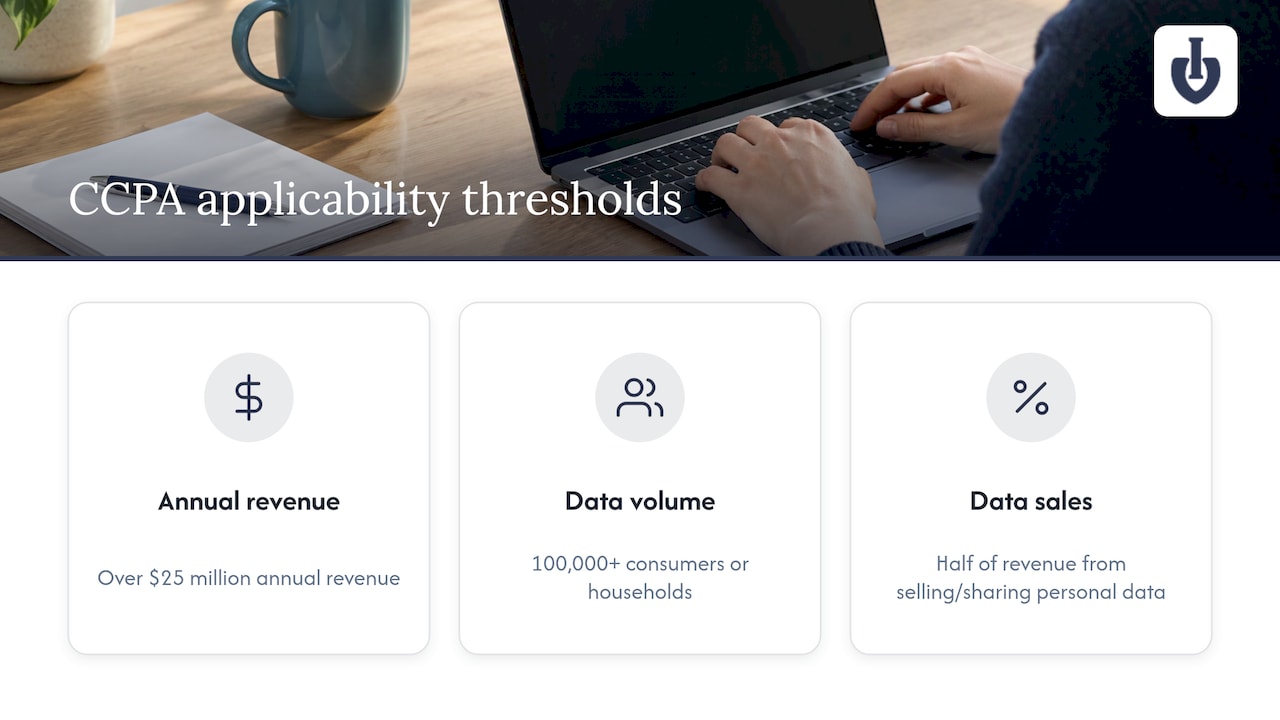
State privacy laws. Several U.S. states have comprehensive privacy laws, many with size or data-volume thresholds. California’s CCPA, for example, covers a business that meets one of three thresholds: over $25 million in annual revenue, handling data of 100,000 or more consumers or households, or earning half its revenue from selling or sharing personal data. A small community contest often falls below those lines, but thresholds and rules change, so confirm with a lawyer if you hold data on many people.
Voters abroad. If your fan awards draw voters from Europe, the GDPR and similar laws may apply to you regardless of where you are based. The Council of Europe principles above are consistent with that approach: minimize, state your purpose, and be transparent. If your contest is large or collects identity documents, speak to a privacy lawyer in the places your voters live.
None of this means a school bake-off needs a legal team. It means the size of your data footprint should set the size of your preparation.
Retention: plan the deletion before the voting
An old voter list is a liability with no upside. Once results are announced and any dispute window has closed, the personal data has done its job.
Build a simple retention schedule:
| Event | Suggested handling |
|---|---|
| Voting open | Collect only the fields in your notice |
| Voting closed | Lock results; stop collecting |
| Dispute or audit window | Keep what you need to resolve challenges, and tell voters how long |
| After window | Delete voter-level data; keep aggregate results |
| Next season | Ask voters to opt in again; do not reuse lists for unrelated marketing |
Aggregate results such as total votes per nominee carry far less privacy risk than a record of who voted. The Council of Europe guidelines treat statistical use of voting data as acceptable when safeguards such as anonymization or pseudonymization are in place and the secrecy of the ballot is respected. That supports a clean rule: keep the totals, drop the identities.
Izivote includes automatic vote closing, which makes the “voting closed” step happen on schedule. Put your deletion date in the same calendar entry.
A privacy checklist before you launch
Use this before you publish your voting link:
- [ ] I can name the purpose of every field on the voting form.
- [ ] I chose the lightest verification method that protects the result.
- [ ] Voter-level data is visible to as few people as possible.
- [ ] Nobody outside the organizing team receives voter lists.
- [ ] A plain-language notice is on the voting page.
- [ ] The notice names the platform and payment processing.
- [ ] A deletion date is set and written down.
- [ ] I know whether minors are voting and have school or guardian rules covered.
- [ ] Voters are told whether their names are ever shown next to choices.
- [ ] A named person answers voter questions and deletion requests.
Where Izivote fits
Izivote is a voting platform for audience and people’s choice awards. You can launch a self-serve voting page quickly, pick the voting mode your event needs, and follow results from a live dashboard. You can start on the Free plan, with no published price, and move up when the event calls for it: Pro is $6 per month or $60 per year, and Premium is $14 per month or $140 per year. Paid voting carries a 10% platform fee per vote. See the pricing page for what each plan includes, or the features overview for the full tool list.
If you run awards, the people’s choice awards page shows how a typical event is set up, and the student elections page covers school votes.
FAQ
Is an online contest vote private by default?
It depends on the voting mode and on what you publish. An open vote collects almost nothing about the voter. Verified modes hold a contact detail or login, so you decide whether names ever appear next to choices. The safe default is to publish only totals and rankings.
Should I collect phone numbers to stop fake votes?
Only if the prize or reputation at stake justifies it. A phone number is more personal than an email address, so use email verification or a login first when they are enough. If you do use SMS codes, say so in your notice and delete the numbers after the dispute window.
Do I need a privacy policy for a small community contest?
A short notice on the voting page is good practice for any contest and may be legally required depending on where your voters live. It should say who you are, what you collect, why, who processes it, how long you keep it and how to request deletion. If you are unsure which laws apply, ask a privacy lawyer.
Can nominees or sponsors see who voted for them?
They should not, unless voters have clearly agreed to be recognized. Share results, not voter lists. This protects supporters and keeps nominees from pressuring fans.
How long should I keep voter data?
Keep it only as long as you need it to confirm results and handle disputes, then delete voter-level data and keep the totals. Tell voters the retention period in your notice. For children’s data in the U.S., COPPA requires keeping it only as long as reasonably necessary.
Sources
- VVSG Principles and Guidelines, NIST
- Guidelines on the protection of individuals with regard to the processing of personal data in voting and elections, Council of Europe
- Privacy notice, Elections in Estonia
- MyVote privacy page, Wisconsin Elections Commission
- National Standard of Online Voting, Canadian municipalities
- Children’s Online Privacy Protection Rule, Federal Register
- CCPA for Small Business: Who’s Covered, What Applies
Recommended