



Email verification voting asks each voter to prove they can open a given inbox before their ballot counts. The voter enters an email address, receives a one-time code or confirmation link, confirms it, votes, and cannot vote again with that address. It is a practical duplicate-vote control for fan awards, people’s choice contests, school elections and community polls. It is not government-grade identity proof, and treating it as one is the most common mistake organizers make.
This guide explains the mechanics, the real limits, the settings that matter, and a pre-launch checklist you can use whether you run a ten-nominee club poll or a public awards show.
Key takeaways
- Email verification proves access to an inbox, not that a voter is a unique person. It cuts casual repeat voting but does not stop someone who owns many addresses.
- Match the control to the stakes: open email verification for public contests, a preloaded voter list with unique links for restricted elections.
- Deliverability is the failure most organizers miss. Test Gmail, Outlook, school and corporate inboxes before launch and publish a recovery path.
- Secure your sending domain with SPF, DKIM and DMARC so your verification emails are trusted and hard to imitate.
- Decide in advance what you store, who can see it, and whether any voter can be linked to a choice.
Table of Contents
- How email verification voting works
- What email verification does and does not prove
- Choosing the right level of verification
- Secure the sending domain before launch
- Deliverability: the problem most organizers miss
- Privacy and ballot secrecy are separate decisions
- A pre-launch checklist
- Watching results: analytics that matter
- How Izivote fits
- Frequently asked questions
- Sources
How email verification voting works
The flow is simple, and the same on most systems:
- The voter opens your voting page.
- They enter an email address.
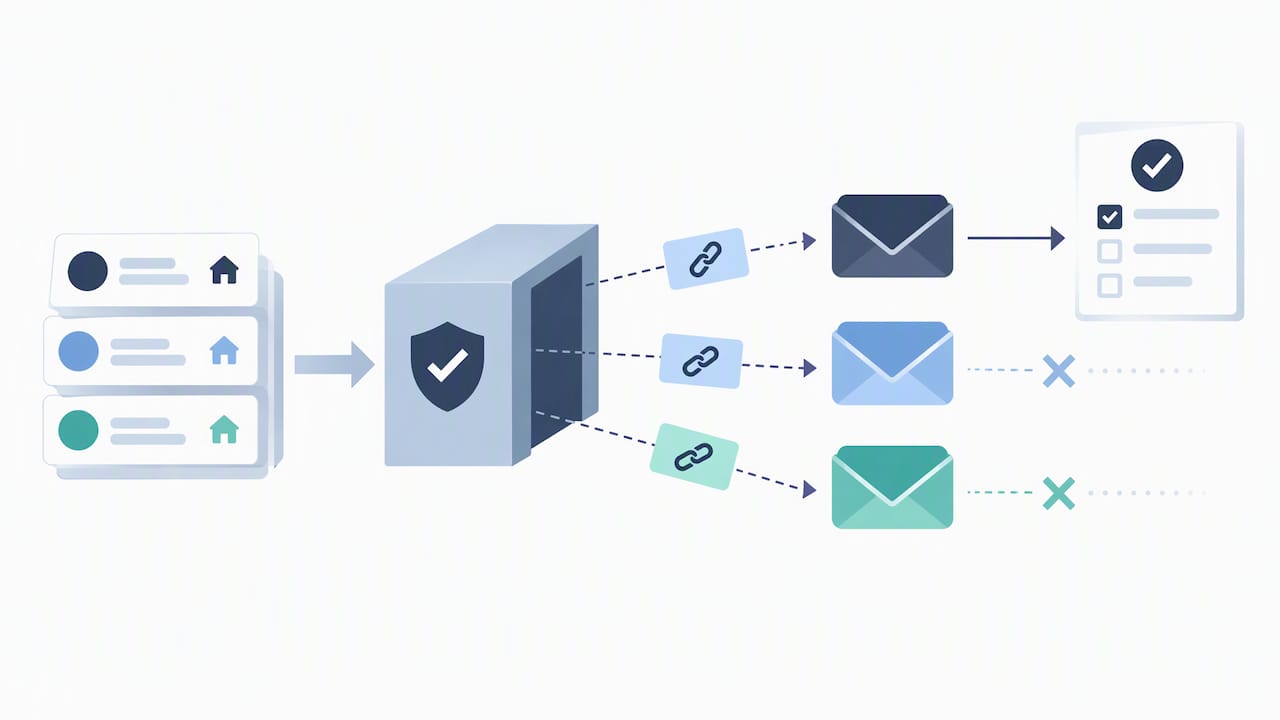
- The system sends a one-time code or a confirmation link to that address.
- The voter enters the code or clicks the link.
- The ballot is accepted and the verified address is marked as used.
- A second attempt with the same address is blocked, or limited to the number of votes your rules allow.
Codes are usually short, expire after a few minutes and work once. A representative setup uses a 6-digit code that expires after 15 minutes, but expiry time, resend limits and how often a returning voter must re-verify are settings on each platform, not universal standards. Choose them deliberately.
There is a stronger variant for restricted votes. Instead of letting anyone type any address, you upload the eligible voter list first and send each person a unique, single-use voting link. That checks two things at once: the person is on your roster, and they can read mail sent to the address you have on file. If you are running a board vote, a membership election or a class-president race, this is the version to use.
What email verification does and does not prove
Be precise about the claim you make to your audience. An email check proves that someone controlled an inbox at the moment of voting. That is all.
The National Institute of Standards and Technology notes in its election security guidance on trustworthy email that email was not designed with security in mind and remains vulnerable to forgery, interception and manipulation. The U.S. Election Assistance Commission’s survey of internet voting similarly treats internet voting security as an ongoing technical and policy risk. Those documents concern public elections, which is a far higher bar than a fan award. Still, the lesson carries over: do not describe email verification as fraud-proof.
In practice, here is what it does well and badly.
| Threat | Does email verification help? |
|---|---|
| Someone clicking vote repeatedly from one browser | Yes, strongly |
| A fan voting twice with the same address | Yes |
| Typo or throwaway addresses | Partly: the code must be received |
| One person with dozens of free addresses | No, unless you add other controls |
| Bots creating addresses at scale | Only with rate limits and review |
| Someone outside your eligible group voting | No, unless you use a roster or approved domains |
The fix for the weak rows is layering, not abandoning the method. For higher-integrity events, combine email verification with a roster, approved email domains, unique single-use links, audit logs, rate limits, anomaly review and, where proportionate, identity or phone verification.
Choosing the right level of verification
Start with two questions: who is allowed to vote, and what happens if the result is disputed?
Public awards and fan contests
When anyone may vote and the goal is one practical vote per reachable person, open email verification is a reasonable default. It is light for the voter, which matters because every extra step costs you participation. Fan awards, pageants, live shows and community contests fit here. If you also raise money through paid votes, a login or identity-based mode gives you a cleaner record of who bought what.
Schools, clubs and member groups
Here eligibility matters more than reach. Upload the roster, restrict by approved domain (for example a school’s student email domain), and send unique links. A student election is a good example: the question is not “did someone vote” but “was that someone a student.” Our student elections page shows how schools run these votes.
Corporate and employee polls
Company polls usually combine a work-domain restriction with one vote per address. Because corporate mail systems filter aggressively, deliverability testing is essential. See how this works on our corporate and employee polls page.
High-stakes votes
If the outcome carries legal or financial weight, such as bylaws, board seats or anything a regulator could ask about, email verification alone is not enough. Use a roster, unique links, audit trails and stronger identity checks, and check your organization’s governing documents and counsel about what method is permitted.
Secure the sending domain before launch
A verification system is only as trustworthy as the email that carries it. Attackers impersonate election-related organizations, and voters who receive a code from an unfamiliar or spoofed sender may either distrust it or fall for a fake one.
The Cybersecurity and Infrastructure Security Agency recommends SPF, DKIM and DMARC for election-related organizations, with DMARC set to reject where possible or at minimum to a monitoring policy of p=none. NIST adds that organizers should use TLS, strong authentication and access control on email accounts, monitoring, malware scanning and official sender addresses.
Translated for an event organizer:
- SPF lists which servers may send mail for your domain.
- DKIM signs messages so recipients can check they were not altered.
- DMARC tells receiving servers what to do with mail that fails those checks.
- An official sender address on your own domain looks more credible than a generic free-mail address.
One limit to remember: these controls authenticate your mail domain. They reduce spoofing and phishing, but they do not prove a voter is a unique human or that the address belongs to an eligible voter. NIST’s guidance on UOCAVA-supporting systems separates authentication, authorization and transport security for exactly this reason: a secure channel and an eligibility model are two different jobs.
If your organization also sends newsletters or donor appeals from the same domain, it is worth reviewing your wider setup. This overview of email marketing platforms for nonprofits is a useful starting point for pre-launch checks on sending practices.
Deliverability: the problem most organizers miss
The most common operational failure is not fraud. It is voters who never receive their code.
Common causes:
- The message lands in spam, junk, promotions or social folders.
- A voter requests several codes and an earlier code is invalidated by a later one.
- Corporate or school filters quarantine the message.
- The voter mistyped their address and never knows.
CISA’s guidance stresses that the verification email must look authentic and be deliverable before the experience can be trusted. Do these things:
- Send test codes to Gmail, Outlook, a school account, a corporate account and a mobile mail app.
- Tell voters on the voting page to check spam, junk and promotions folders.
- Say plainly that requesting a new code cancels the old one.
- Publish a support address or form for voters who are stuck.
- Watch for a spike in requests with no matching votes. It usually signals a delivery problem.
A voter who gives up at the code screen is a lost vote, and in a paid contest it is lost revenue too.
Privacy and ballot secrecy are separate decisions
Many organizers assume that verifying an email means knowing who voted for whom. It does not have to. A system can keep an eligibility record showing that an address has voted while storing the ballot separately. NIST’s UOCAVA guidance treats these as distinct design choices.
For a fan award, linking voters to choices is rarely needed, and voters care about how their address is used. Write down, and publish in plain language:
- What you collect (the address, the timestamp, the choice).
- Whether the address can be connected to the choice by anyone, including you.
- How long you keep the data and who has access.
- Whether you send any follow-up mail, and how a voter opts out.
If you have voters in jurisdictions with privacy laws, such as the EU or California, check with a qualified privacy adviser about notice and retention requirements for your event.
A pre-launch checklist
Use this list before you open voting:
- Define eligibility. Who may vote, and may they vote more than once (once per category, once per day, or once overall)?
- Pick the method. Open email verification, or a preloaded roster with unique links.
- Configure the sender. Official address, SPF, DKIM and DMARC in place.
- Set the limits. Code expiry, resend limits and rate limits per address and per network.
- Test delivery. Consumer, school, corporate and mobile inboxes.
- Write the help text. Spam-folder advice, a support contact, and what to do if a code fails.
- Plan monitoring. Who watches for duplicate or abnormal activity, and how often?
- Preserve records. Keep an audit trail and a final results report.
When comparing voting software, Capterra’s voting software guidance suggests also checking voter-capacity limits, automated reminders, candidate profiles, real-time dashboards and exportable reports. Those are sensible questions to put to any vendor, including us.
Watching results: analytics that matter
Verification only protects you if you look at the data while voting runs. Whatever tool you use, you want a live dashboard that shows:
- Votes over time, so a sudden surge at 3 a.m. stands out.
- Votes per nominee and per category.
- Verified versus unverified attempts.
- Repeated attempts from one address or network.
- An export you can keep after voting closes.
A sharp jump for one nominee is not proof of cheating, since a nominee may simply have shared the link with a big audience. It is a prompt to look closer, and to decide beforehand what you will do about it, for example reviewing suspicious votes before results are published. Writing that rule down before launch protects you from accusations of bias afterward.
How Izivote fits
Izivote is built for public audience awards and events. You can set up a voting page yourself on the web, run multi-category votes with photo nominee profiles, embed the voting page on your own site, allow self-nomination and close voting automatically. Voting modes include open, paid, login-based and identity-based, so you can match the control to the event, and the dashboard shows votes in real time so you can spot odd patterns while voting is still open. See the full list on our features page, or how organizers run people’s choice awards and fan awards.
Pricing is published on our pricing page: a Free plan for small events, Pro at $6 per month or $60 per year, and Premium at $14 per month or $140 per year. Paid voting carries a platform fee of 10% per vote. If you are not sure which voting mode suits your contest, start on the Free plan and test the voter experience yourself before you announce anything.
Frequently asked questions
Is email verification enough to stop fake votes?
It stops casual repeat voting, but not a determined person with many inboxes. For public contests that trade-off is usually acceptable. Where it is not, add a voter roster, approved domains, rate limits and review of unusual activity, and consider identity or phone checks.
Should voters need an account to vote?
Not necessarily. An email code with no account keeps the process quick and gets higher participation. Use login or identity-based voting when you need a clearer record, for example in paid voting or restricted member votes.
What should I do when voters say they never got the code?
First ask them to check spam, junk and promotions folders, and to request only one code at a time, because a new code can invalidate the earlier one. Then check your sender authentication and test with the same mail provider. Keep a support contact visible on the voting page.
Can I run an email-verified vote for a school or workplace?
Yes. Restrict voting to an approved domain or upload a roster and send unique links, so only people on your list can vote. Test the messages against the school’s or company’s mail filters before opening the ballot.
Sources
- NIST: Implementing Trustworthy Email, Election Security Series
- CISA: Actions to Counter Email-Based Attacks on Election-Related Entities
- NIST IR 7682: Information System Security Best Practices for UOCAVA-Supporting Systems
- U.S. Election Assistance Commission: A Survey of Internet Voting
- Capterra: Best Voting Software 2026
- Email marketing platforms for nonprofits: comparison
Recommended